Court email automation, built by a litigator, cited to the rule.
CourtFlow reads the court’s email, applies your local rule, and puts the deadline on your calendar with the citation and the day-count arithmetic shown, so you verify the date instead of trusting it. Other tools hand you a date without the arithmetic. Gmail or Outlook, documents filed into your own Drive, never ours. The 60–90 minutes a day of triage goes back on your calendar.
What it looks like
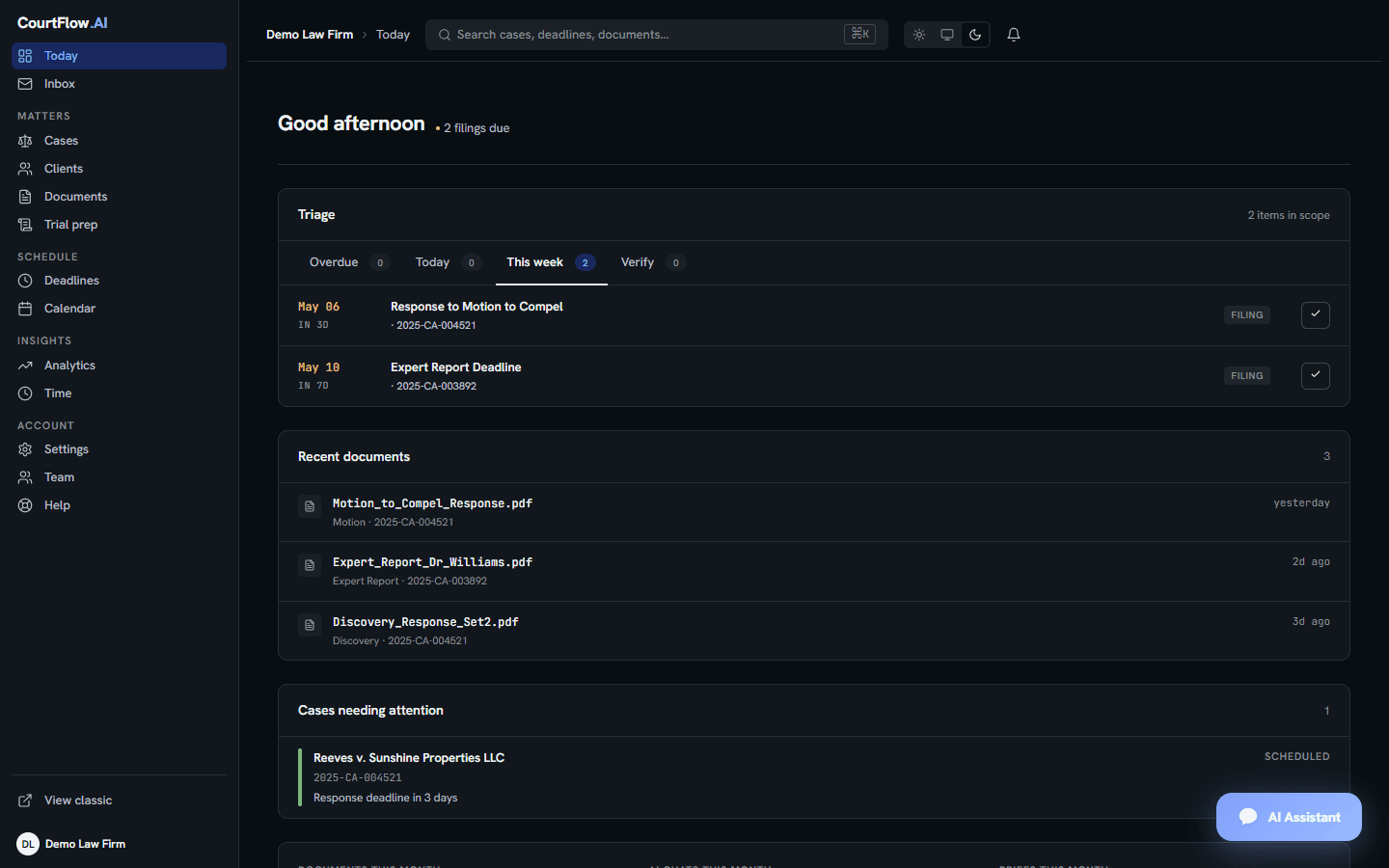
The dashboard, on a slow Tuesday.
Two filings due this week, three documents filed yesterday, one case needing attention. Every deadline carries the rule that produced it; every document lives in your own Drive.
Before and after
The same Tuesday, with and without CourtFlow.
60 to 90 minutes before you start practicing law.
The reading, the rule lookup, the calendaring, and the filing happened on arrival.
Operating data
How CourtFlow has been used.
Live counts from the production system, not projections.
At twelve minutes per court email (the same assumption as the calculator below), this week’s reading alone is roughly 60 attorney-hours handled.
What it does
Three things, done well.
Every court email, parsed in under 60 seconds.
There’s nothing to upload: your court inbox is the input. Inbound filings are extracted on arrival. Case numbers, parties, filing types, and deadlines are detected and structured before you would have finished scrolling past the email.
Your local rule applied, with the math shown.
No deadline lands on your calendar without the citation to the underlying federal or state rule, the triggering document, and the day-count arithmetic shown on screen, so you can verify a date, not just trust it. If the citation is unclear, the deadline is flagged for your review instead of guessed. See the rules library behind it →
Into your own Drive, never ours.
Each filing is named consistently, organized into your case folders, and written to the Google Drive or OneDrive you already use. CourtFlow holds no document custody. Revoke OAuth, the connection ends.
Already running Clio, MyCase, or Smokeball? See how CourtFlow fits alongside them →
A worked example
One filing, start to finish. The arithmetic on screen.
A request for production served through the Florida Courts E-Filing Portal at 8:14 in the morning, followed all the way to the calendar entry, including the day-count that produced the date, so you can check it rather than trust it.
Your court inbox is the input.
CourtFlow reads the Gmail or Outlook mailbox you already use, through OAuth. There is nothing to forward, nothing to upload, and no new inbox to check.
The other two messages are left alone. CourtFlow acts on filings served by the court and the portal, not on ordinary correspondence.
Synthetic matter. The case, parties and documents are invented for this walkthrough; the rules, the arithmetic, the folder naming and the summary-email columns are the ones CourtFlow actually uses. Florida procedure shown. The same engine runs against the federal rules for CM/ECF matters.
Read the narration as text (3:14)
01 · Arrives
No new inbox. No forwarding rules. Of the three messages that came in this morning, one is from the court. That’s the only one it touches.
02 · Retrieved
The notice carries a link, not the filing. It follows the link, pulls both documents, and works on them in memory. Nothing lands on our servers.
03 · Read
It reads the filing, not the subject line. The clerk’s raw case number gets normalized to what your circuit actually prints. And where the document is silent (the judge, here), the field stays blank.
04 · Cited
This is the part worth slowing down for. Served Thursday, August thirteenth. Thirty days to respond under Rule 1.350(b). E-service adds nothing. That five-day extension went away in 2018. Thirty days out lands on Saturday the twelfth. So the period runs to Monday the fourteenth. Every line of that is on screen, with the rule beside it. You’re checking a date, not trusting one.
05 · Flagged
Three dates came out of one notice. One computed. One stated outright. And one, a passing reference with nothing behind it, goes to a review queue instead of onto your calendar. A date it can’t cite is a date it won’t assert.
06 · Filed
The PDFs go into your Drive. Your client folder, your case folder, named off the filing date, not off any deadline inside the document. Plus a first-draft response in Word, for you to edit. Revoke the connection tomorrow and every bit of it stays exactly where it is.
07 · Calendared
Then onto the calendar you already keep, routed to the attorney on the matter. The citation rides along inside the entry, so in five weeks, when you open it, the reasoning is still there.
08 · Sent
And one email back to you. Five columns. The two that matter are Authority and Calculation. The rule, and the math. That’s the whole filing, reduced to what you have to decide, in your inbox about a minute after the court’s notice was.
09 · On the board
The same deadline on the morning board, next to every other matter in the firm, sorted by what’s actually due. A rule under every row. Nothing here is a date without a reason attached.
10 · Afterwards
And it keeps checking after the fact. Anything saved but not calendared gets picked up. Reminders escalate as the date closes in. And a standing audit hunts for deadlines that were extracted and never landed anywhere, because a pipeline that reports nothing wrong isn’t the same as a pipeline that’s right.
And the same logic, federal
Motion to dismiss, in days. Rule citations on every mark.
The engine is not Florida-specific. Here is a federal Rule 12 schedule rendered from the same rules library.
One worked example: a motion to dismiss filed under Fed. R. Civ. P. 12. CourtFlow extracts every date on this graph from the underlying email and writes them to your calendar with the rule citation attached. Discovery, summary judgment, and appellate windows are detected the same way, against the rules in the jurisdiction your case is filed in.
Who built this
Built by a Florida litigator who was tired of reading court email.
I’m Paul Kogan. I practice litigation in Florida. CourtFlow started as the tool my own mornings needed: 60–90 minutes of court email, every day: download the PDF, read the order, look up the rule, calendar the deadline, file the document into Drive, repeat.
So I built the thing that does that work before I sit down. It has run on my own cases every day since. Every deadline it calendars cites the rule that produced it, because that is the standard I hold my own calendar to.
Paul KoganFounder, CourtFlow AI · Licensed Florida attorney
If you prefer numbers to claims
How much CourtFlow reclaims for your firm.
Based on twelve minutes per court email for reading, calendaring, and filing. Weekly volume scaled to monthly at 4.33 weeks.
For comparison: CourtFlow is $149 per attorney per month, about 30 minutes of the time above, at your rate.
Pricing
One plan. Pay per attorney.
- Unlimited document processing, AI chats & briefs
- Automated deadline detection with rule citations
- Multi-attorney case assignment
- 3 free discovery analyses/month
- Volume discounts as you add attorneys
14-day free trial, no credit card required. Cancel anytime. See full pricing details.
Where your data lives
We hold metadata, not documents. You can pull the plug at any moment.
OAuth 2.0, not passwords
Connection to Gmail, Outlook 365, Google Drive, and OneDrive is scoped, revocable, and password-free. We see only the mailbox folders and Drive locations you grant.
Documents stay in your custody
Filings and exhibits are written into the Drive or OneDrive your firm already pays for. CourtFlow does not store, host, or copy them outside your tenant.
Encrypted at rest
Case metadata (parties, deadlines, citations) is encrypted at rest in our database, scoped per firm, accessible only to attorneys you authorize.
Common questions
Asked enough times that they earn an answer.
CourtFlow uses OAuth 2.0 for revocable authorization. We never see your password. Documents are filed directly to your Google Drive or OneDrive and never stored on our servers. Case metadata (party names, case numbers, deadlines) is stored encrypted in our database to power your dashboard, and you can revoke access at any time.
CourtFlow is built by Paul Kogan, a licensed Florida attorney with an active litigation practice. It runs on his own cases every day, which is why deadlines carry rule citations and documents stay in your own Drive. Those are the standards a practicing litigator holds his own calendar and files to. Support questions are answered by people who understand litigation workflows.
No. CourtFlow reads court emails directly from your Gmail or Outlook inbox using scoped OAuth. There is nothing to upload, no PDFs to drag in, and no manual data entry. Each filing is extracted on arrival and written back into the case folders of your own Google Drive or OneDrive. If you do want to analyze a single filing without connecting your inbox, our standalone /try tool accepts a one-off upload.
Sign up, connect your email, start using CourtFlow. No credit card required to start. The 14 days begin when CourtFlow processes your first court filing, not the day you sign up, so you get the full 14 days of the product actually working on your docket. At the end of the trial, access pauses until you choose a plan. Nothing is ever charged unless you enter a card yourself.
Every detected deadline includes a confidence level and a citation to the underlying procedural rule. CourtFlow is designed as a force multiplier alongside attorney judgment, not a replacement for it. We always recommend attorney review of detected deadlines before relying on them.
No. It is an additional check. Every AI-detected deadline carries a confidence level and a rule citation so you can verify it, and the daily briefing lists what is coming due. Keep your firm's docketing practice; CourtFlow feeds it.
CourtFlow works alongside Clio, MyCase, Smokeball, and similar systems. It reads from your email and writes to your Drive and Calendar; it does not replace your case management system, it feeds it. Documents land in your Drive where any other software can access them.
Yes. Cancel from your dashboard settings at any time. Your subscription stays active through the end of the current billing period. No cancellation fees, no questions asked.
Coverage
Built for litigators, indexed by practice area and jurisdiction.
Browse CourtFlow by where and how you practice. Florida state courts and federal CM/ECF are live today.
Ready when you are
14 days. Your court email. Rule-cited deadlines.
No credit card to start. Your 14 days begin when CourtFlow reads your first filing, not the day you sign up.